With any phone number we can reach the destination where it is oprated with the help of (GPS) Global Positining System.
If ever Fall in any situation where police following you every where then shut down your phone first or you may put it in such a place where it contunious travel from one place to another! like .. throw it in any bue or car
2.whenever you restart your computer your (IP) Changed ! no matter where you are in this world but we can find you with your ip ! but some tricks that make you vanish.. form the world of cyber crime !! but you still remain there and do watever u want!! :)
3.Mac- every computer have a hard address written on there Pc Chip ! every time you log in change it first!
thats all for tonight!
Turkiya786


Wednesday, August 25, 2010

Thursday, June 17, 2010
Remember these Points

Things to remember ,Normally we dont care about all these silly things, but today when my Hdd Fails Then i Realise Every thing have their own Value !
1. Never Turn off your computer without shut down
2.After Every Restart or shut down start your computer after 10 min
3.Never Use any liqure for clening Propose
4.If water swell up on any part of your pc, dont turnon it for 2 days and keep it Under Bulbs Light
5.Use ground in your Circuit, it will improve your pc life
Saturday, June 12, 2010
Free Calling SoftWare
Download All Free Softwares Ever need for you.....
All are free and virus free i have downloaded all hurry click here
install gost for window installation in just 2 minutes
Click here
All are free and virus free i have downloaded all hurry click here
install gost for window installation in just 2 minutes
Click here
Saturday, June 5, 2010
Saturday, May 29, 2010
Make a Partition into Partition
Mount a Drive or Partition to a Folder:-

Steps:-1
Go to run and Type:- COMPMGMT.MSC
Then Click on Disk Managment
A) Shrink a partition to create a new unallocated partition.
B) Right click on the unallocated partition, and click on New Simple Volume. (See screenshot below)

C) Click on the Next button. (See screenshot below)
((((Click on the image to see it Clearly))))

D) Select how much space you want of the maximum disk space available for the partition, and click on the Next button. (See screenshot below)
NOTE: Normally you will select all of the available space unless you wanted to create another partition with the left over maximum disk space.

E) Select (dot) Mount in the following empty
NTFS folder option, and click on the Browse button. (See screenshot below)

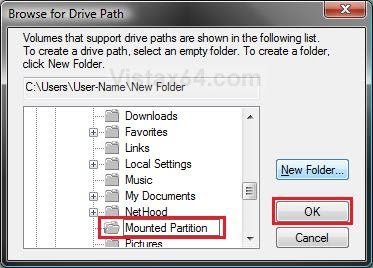
F) Navigate to the location you want to place the empty New Folder that will bmounted(mapped) to the partition, then click on the New Folder button.
(See screenshot below)

G) Type in a name for the folder to describe the mounted partition, and click on OK. (See screenshot below)

H) Click on the Next button. (See screenshot below)

I ) Type in a name (label) for the mounted partition. Check the Peform a quick format option box, then click on the Next button. (See screenshot below)

J) Click on the Finish button. (See screenshot below)

K) You now have a new mounted partition. (See screenshot below)

L) You now have a new partition that is mounted to the folder at the location you selected in step 1F. (See the example at the top of the tutorial)
Wednesday, May 26, 2010
Burn CD without Nero Or Any software

Dear friends,
Sometime you have face that .. ... you are using ur friends Computer but there is Nero not installed on its os, then you want to make CD its important, you dont have nero @ now so what will you do???
Just follow these steps.........
1.Copy files to your Computer For example NEwfolder ......in dir c:
2. Open my copmputer
3.then open Disk drive and Drag that folder into you cd\dvd drive now all your data will be stored in Drive .. just click on Burn this files to cd and ur cd is ready for use....




Subscribe to:
Posts (Atom)
