

Saturday, April 24, 2010

Tuesday, April 20, 2010
Recover Logon PassWord!! with Magic Stick!!

Creating a Windows XP password reset disk is a great way to protect yourself from the possibility of forgetting your account password. With it, you can easily reset your password and get right in to Windows XP.
It's true that there are ways to recover pass without a password reset disk but they are often complicated and time consuming.
Be proactive by creating a password reset disk right now. With a password reset disk, you don't ever have to worry about forgetting your password again.
Follow these easy steps to create a password reset disk for your Windows XP account:
Difficulty: Easy
Time Required: Creating a password reset disk for your Windows XP logon usually takes less than five minutes
Here's How:
Click on Start and then Control Panel.
Click on the User Accounts link.
Note: If you're viewing the Classic View of Control Panel, double-click on the User Accounts icon.
In the pick an account to change area of the User Accounts window, click on your Windows XP user name.
In the Related Tasks area on the left, click the Prevent a forgotten password link.
When the Forgotten Password Wizard window appears, click Next
Note: You will need a Pen Drive and a blank Pen Drive.
On the next screen, verify that a blank floppy disk is inserted in your floppy disk drive.
Click Next to continue.
With the disk still in the drive, enter your current account password in the text box and click Next.
Windows XP will now create the password reset disk.
When the progress indicator shows 100% complete, click Next and then click Finish in the next window.
You can now remove the floppy disk from your computer.
Label the disk "Password Reset" and store it in a safe place.
Mail me if you need more help!!
Thursday, April 1, 2010


Wednesday, March 31, 2010
HAVE FUN !!
Good Morning!
today im thinking to have some fun!!!
 whenever you go to cyber cafe! does your friend guess! you have been go there a little time ago! nop!!! he/she never !!!
but if you want to put some signs that u had use this computer for a while , how will you do this????
Simple ! write your name on the computer!
oh, your thinking its not possible! dear let me show you how!!!!

today im thinking to have some fun!!!
 whenever you go to cyber cafe! does your friend guess! you have been go there a little time ago! nop!!! he/she never !!!
but if you want to put some signs that u had use this computer for a while , how will you do this????
Simple ! write your name on the computer!
oh, your thinking its not possible! dear let me show you how!!!!
ok friend im telling u how to do this .............
1.Click on........Start...............Run...........type .......... Control
2.click on regional and Language option......... coustom........Time
Put your Name in ................Am or pm symbol and apply!
now you can see your name in the task bar! Congrats!
Regards
Anil Kumar Turkiya
Change The Drive Icon
Change your Icon!
 Dear friends,
Some time you have insert a disc into your pc and instantly a program srtart!
you wondered how it is done ! you hadn't touch your key pad !
it is possible by a simple trick! that i will tell u in my next post ! now im telling u how to change the drive icon of ur discs! it may be cd, dvd, discdrives such c:,d:,e:, etc.
Its very simple and short!
First thank to god that you are my friend and reading this, and give me some good words like ,, Thanks
Steps........
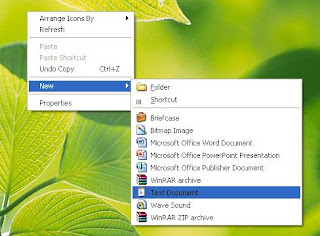
1.Creat a notpad file and arrange an image of any think you like !
Remember .... image should be in .ico format !
like if u put jpeg, or bmp image it wont work !
 Dear friends,
Some time you have insert a disc into your pc and instantly a program srtart!
you wondered how it is done ! you hadn't touch your key pad !
it is possible by a simple trick! that i will tell u in my next post ! now im telling u how to change the drive icon of ur discs! it may be cd, dvd, discdrives such c:,d:,e:, etc.
Its very simple and short!
First thank to god that you are my friend and reading this, and give me some good words like ,, Thanks
Steps........
1.Creat a notpad file and arrange an image of any think you like !
Remember .... image should be in .ico format !
like if u put jpeg, or bmp image it wont work !
2. Then write these lines........
[autorun]
icon=water_melon.ico
3.Now copy and paste the image name , and save it as autorun.ini
for example----icon=Anil.ico
4.and put them into root directory !
Root dir--- when you open your drives the first area u see is root directory! of any think !it may be your cd/dvd.
if u like this please comment !
Khyal Rakhana
Regards
Anil Kumar (Turkiya)
Tuesday, March 30, 2010
PHOTO EFFECTS
Want to make your own photo effects ! like i have made to my image ! cool!!!!!!
NOW U CAN ALSO MAKE SUCH EFFECTS!!
There are many sites which offers such effects, but most of them have some common errors and limited no of effects .Now im telling u the one and only Great site that is sufficient for all!!!!

Click here
its a great site offering over 1000 effects and more than 2500 Animation effects
and you can download their software and make own effects instantly! cool na!
go to the site and have fun
Regards
Anil Kumar Turkiya
NOW U CAN ALSO MAKE SUCH EFFECTS!!
There are many sites which offers such effects, but most of them have some common errors and limited no of effects .Now im telling u the one and only Great site that is sufficient for all!!!!

Click here
its a great site offering over 1000 effects and more than 2500 Animation effects
and you can download their software and make own effects instantly! cool na!
go to the site and have fun
Regards
Anil Kumar Turkiya
SPEED BOOSTER 4XP
Dear friends,
Simple methods are always useful! im telling u the best u can get from me !
it will increase ur pc speed up2 25%, so in my previous post i have give u 25% speed tip and now this one !
25+25= 50 u can speed-up ur pc more than that! is great im very excited, u???
lets do it ..............
1. hold down Alt+ ctrl keys and press Delete, this will open a task bar window
like the one below (.'')
 2.click on view =>
=>update speed
high.
You have done it!!!!!
they are foolish things for me and any hacker ! but now im trying to teach u
ABC........... after that , u are able to make ur own poems!
Regards,
Anil Kumar (turkiya)
Simple methods are always useful! im telling u the best u can get from me !
it will increase ur pc speed up2 25%, so in my previous post i have give u 25% speed tip and now this one !
25+25= 50 u can speed-up ur pc more than that! is great im very excited, u???
lets do it ..............
1. hold down Alt+ ctrl keys and press Delete, this will open a task bar window
like the one below (.'')
 2.click on view =>
=>update speed
high.
You have done it!!!!!
they are foolish things for me and any hacker ! but now im trying to teach u
ABC........... after that , u are able to make ur own poems!
Note-- i will teach u Ethical hacking !
Regards,
Anil Kumar (turkiya)
Subscribe to:
Posts (Atom)
